AI Food Label Generator for EU Markets
Create multilingual food labels from scratch or transform existing packaging into editable, translated and print-ready labels for European markets.
Built for food importers, exporters, retailers and growing brands that need a faster way to prepare labels for different markets and languages.
AI-assisted preparation keeps every label ready for human review.
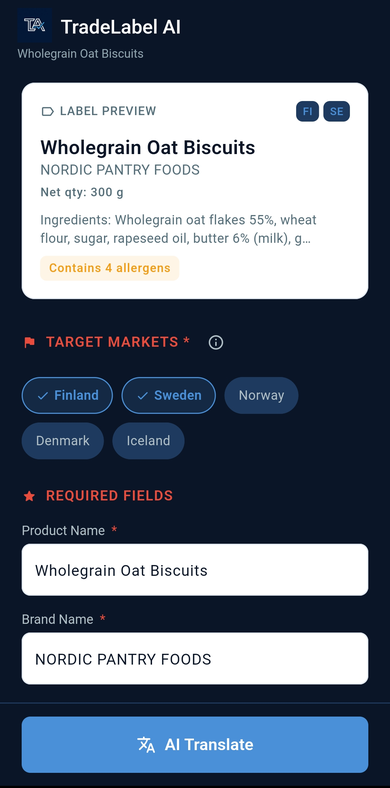
Organize translated label content for the markets on your list.
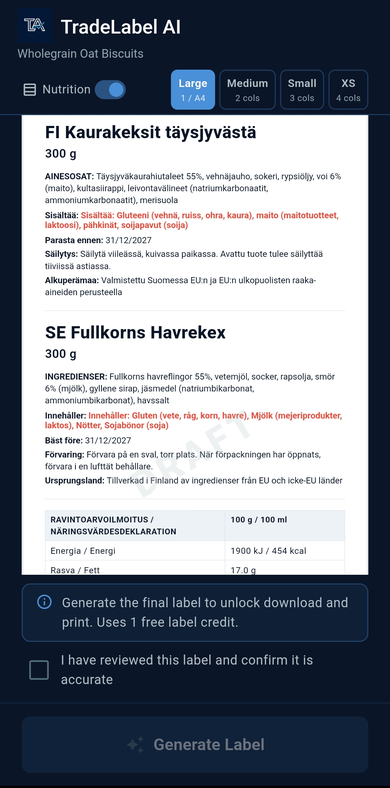
Review the layout and prepare output for your printing workflow.
Create a Food Label Your Way
TradeLabelAI supports two practical starting points: building a fresh label record or turning existing packaging into a structured draft your team can review.
Build a new label record without a package file.
Start with the product information you already have and create a label record before design, printing, or supplier revisions begin.
- Enter product information and product name
- Add ingredients and allergen information
- Review nutrition information and net quantity
- Include importer or responsible business details
- Select target markets and working languages
- Generate a structured label draft for review
Scan packaging and turn it into editable fields.
Start from the label already on pack, extract the content into reviewable fields, and prepare multilingual versions without treating the app as only a scanner.
- Scan or capture an existing food label
- Extract structured information from the packaging
- Review the detected fields and correct details
- Translate the content for target languages
- Adjust the information before approval
- Generate a print-ready label draft
Already working from supplier packaging and mostly need translation and review? Explore the dedicated workflow for translating an existing food label.
Explore Food Label TranslationCreate Multilingual Food Labels Without Rebuilding the Design
When a product moves into new European markets, the packaging information often needs to be prepared in different languages. TradeLabelAI helps teams organize the content and prepare translated versions around the same structured label record.
Instead of rebuilding each label from the beginning, your team can keep product details in one workflow, review translations market by market, and prepare versions for the languages your business needs.
That can include preparing labels for markets that need Finnish, Swedish, German, French, and other supported languages used in your selected workflow.
Prepare local-market versions from the same product record.
Keep multilingual content aligned when a label serves more than one market.
Review translated fields before they move into final layout.
Reuse structured content when product information changes.
Bring Essential Food Label Information Together
TradeLabelAI helps you organize and review label information before generating the final label.
Product name
Keep the main product identity visible and editable.
Ingredients
Capture and review the full ingredient list in one place.
Allergens
Surface allergen information for human verification.
Nutrition information
Work with structured nutrition values before export.
Target markets
Track which markets and language versions the label serves.
Languages
Prepare multilingual label content from the same workflow.
Net quantity and storage
Keep practical pack details together for review.
Usage and preparation instructions
Edit instructions before they move into final layout.
Business and origin details
Review importer, responsible business, and origin fields where applicable.
Generate Labels Ready for Your Printing Workflow
Prepare the label once, review the content, and generate layouts suitable for common printing workflows.
Built for Food Businesses Selling Across Markets
Importers
Adapt supplier packaging into a destination-market label record your team can review and prepare.
Exporters
Prepare multilingual label versions for distributors, retailers, and customers across Europe.
Retailers
Create practical local-market labels for imported products moving onto store shelves.
Food brands
Keep reusable product information organized across product lines, languages, and markets.
A Faster Workflow Than Rebuilding Labels Manually
Keep structured product information in one workflow instead of copying between spreadsheets, design files, and email threads.
Prepare multilingual versions from the same label record instead of starting over market by market.
Make updates in one place when ingredients, business details, or translations need to change.
Move from label creation or scanning to review and print preparation without breaking the process into disconnected tools.
Built for preparation and final team review.
TradeLabelAI helps prepare structured food label content faster. Your team can review, edit, and approve the final version before it moves to packaging, printing, or market use.
From Product Information to Print-Ready Label
Add or Scan
Create a label from scratch or scan existing packaging.
Review
Check extracted or entered product information.
Translate and Prepare
Choose target markets and languages.
Generate
Create the final label layout for printing or export.
Frequently asked questions
What is an AI food label generator?+
An AI food label generator helps turn product details or existing packaging into a structured label draft that your team can review, translate, and prepare for printing. TradeLabelAI is built to support that workflow for food businesses preparing labels for EU markets.
Can I create a food label from scratch?+
Yes. You can start with product information, ingredients, allergens, nutrition details, business information, target markets, and languages, then build a label record without needing an existing package design first.
Can TradeLabelAI translate an existing food label?+
Yes. You can scan or capture an existing label, extract the text into structured fields, review what was detected, adjust the content, and prepare translated label information for your selected markets.
Can I create labels in multiple languages?+
Yes. TradeLabelAI helps you organize label content for different target markets and prepare multilingual versions without rebuilding the label information from the beginning each time.
Is TradeLabelAI only for EU businesses?+
TradeLabelAI is focused on businesses preparing food labels for European markets. That includes importers, exporters, retailers, and food brands that need label content organized for EU market workflows.
Can I print generated labels?+
TradeLabelAI helps you review content, preview the label layout, and generate output that fits common print preparation workflows. Your team should still confirm the final format and printer-specific requirements before production.
Does TradeLabelAI guarantee EU food-label compliance?+
No. TradeLabelAI assists with label preparation and review, but the business remains responsible for final regulatory compliance.
Start creating, translating, and preparing labels in one workflow.
Download TradeLabelAI now on iPhone or iPad, or join the Android early access list.